In this post, we’ll explore how to significantly upgrade our car dealership agent’s ability to answer specific questions about car models. While a standard Retrieval-Augmented Generation (RAG) approach is effective for finding relevant documents, it can struggle with queries that require understanding the relationships between different data points—for instance, connecting a specific engine type to its horsepower and then to the car models that use it.
To overcome this, we’ll implement a graph-based memory system. This approach enables our agent to navigate a network of interconnected information, resulting in more precise and context-aware answers. We will use Cognee, a powerful AI memory engine, to automatically analyze our documents and construct this knowledge graph. Follow along to see how we build the graph, search it, and integrate it into our agent to handle complex user questions with ease.
Cognee
Cognee is an AI memory engine designed to enhance the accuracy and efficiency of AI agents. It transforms data, such as text, media, PDFs, and tables, into structured “memories” by building comprehensive knowledge graphs. Some of it’s key features are:
- AI Memory Engine: Mimics human cognitive processes to convert data into structured “memories” for improved understanding and output.
- Knowledge Graphs: Creates and utilizes knowledge graphs to create connections within data, establishing relationships between knowledge clusters, and improving data usability for LLMs.
- Modular ECL Pipelines: Features modular Extract, Cognify, and Load (ECL) pipelines for flexible data handling and retrieval.
Creating our graph
As our LLM model, we will use the gemini/gemini-2.0-flash, and for embeddings avr/sfr-embedding-mistral:latest . The embeddings model is running locally using Ollama. If you need some help installing Ollama, take a look at this post Manjaro + ROCm + PyTorch + LMStudio + Ollama.
You can use the .env-template file to set your model and api keys.
## If you want to use a local model to create the graph memory
# LLM_API_KEY = "ollama"
# LLM_MODEL = "phi4:latest"
# LLM_PROVIDER = "ollama"
# LLM_ENDPOINT = "http://localhost:11434/v1"

LLM_PROVIDER="gemini"
LLM_API_KEY=
LLM_MODEL="gemini/gemini-2.0-flash"
LLM_ENDPOINT="https://generativelanguage.googleapis.com/"
LLM_API_VERSION="v1beta"

EMBEDDING_PROVIDER="ollama"
EMBEDDING_MODEL="avr/sfr-embedding-mistral:latest"
EMBEDDING_ENDPOINT ="http://localhost:11434/api/embeddings"
EMBEDDING_DIMENSIONS=4096
HUGGINGFACE_TOKENIZER="Salesforce/SFR-Embedding-Mistral"

GOOGLE_API_KEY=
https://github.com/danieladriano/car-dealership-agents/blob/cognee/.env-template
First, we need to ingest our data using the add method from Cognee. This step involves normalizing the data, classifying it by file type, recording essential metadata like source location, and deduplicating content to ensure efficiency. The data is then organized into datasets and segmented into smaller, token-limited chunks, preparing it for detailed analysis.
After data ingestion, we call cognify to create our knowledge graph. In this core step, each chunk is processed by a Large Language Model (LLM), which extracts structured information by identifying key entities, relations, and summaries. These structured outputs are then used to assemble the nodes and edges of the graph. Finally, the entire output—including the graph structure, metadata, and vector embeddings—is indexed into specialized storage systems: a graph database for complex queries, a relational store for metadata, and a vector index to enable robust similarity-based retrieval. We also include functions to prune old data and visualize the resulting graph for verification To run the pipeline, execute make create-graph.
import asyncio
import os
from argparse import ArgumentParser
from pathlib import Path

from cognee import add, cognify, config, prune, visualize_graph

def config_cognee() -> None:
    root_path = Path(os.getcwd())
    data_directory_path = Path(root_path, ".data_storage").resolve()
    cognee_directory_path = Path(root_path, ".cognee_system").resolve()

    config.data_root_directory(str(data_directory_path))
    config.system_root_directory(str(cognee_directory_path))

async def prune_cognee() -> None:
    await prune.prune_data()
    await prune.prune_system(metadata=True)

async def main(assets_path: Path) -> None:
    config_cognee()
    await prune_cognee()

    for file_path in assets_path.iterdir():
        with open(file_path, "r") as file:
            file_content = file.read()
            if file_content:
                await add(file_content)

    await cognify()

    graph_file_path = str(
        Path(os.getcwd(), ".artifacts/graph_visualization.html").resolve()
    )
    await visualize_graph(graph_file_path)

if __name__ == "__main__":
    argument_parser = ArgumentParser()
    argument_parser.add_argument("--files", "-f")
    args = argument_parser.parse_args()

    asyncio.run(main(assets_path=Path(args.files)))
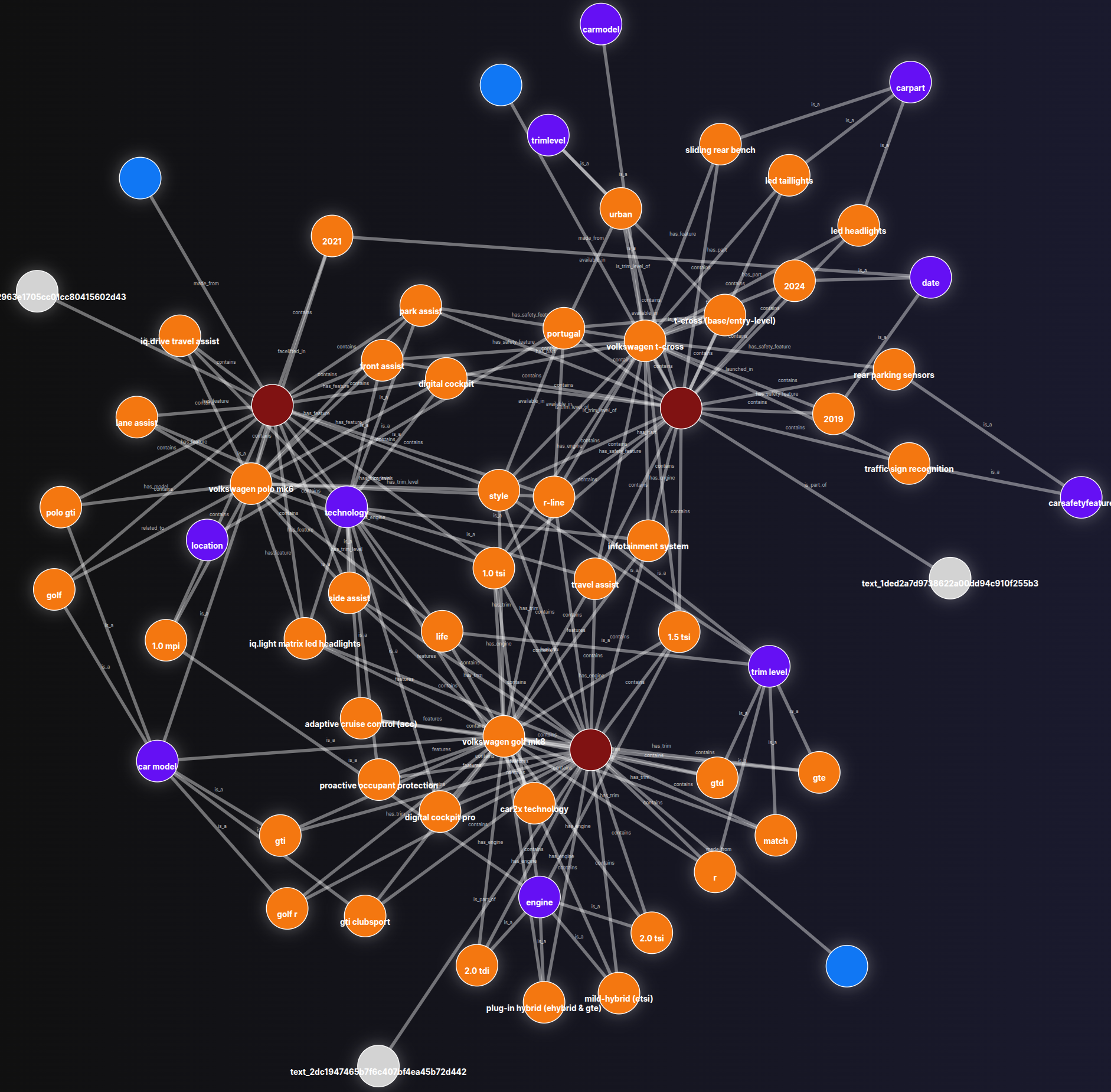
One of the outputs will be the graph_visualization.html file, which allows us to examine our knowledge graph. Execute make visualize-graph then access [http://0.0.0.0:8000](http://0.0.0.0:8000/.artifacts/graph_visualization.html)/.
Search in our graph
To search in our graph, we need to load Cognee, pointing to the data storage and system that we created before. Then, we can execute cognee.search passing the query_text and the query_type . In this example, we are using cognee.SearchType.RAG_COMPLETION as query_type .
To run the search script, make search-graph.
import asyncio
import logging
import os
from pathlib import Path

import cognee
import streamlit as st

logger = logging.getLogger(__name__)

def load_cognee() -> None:
    data_path = Path(os.getcwd(), ".data_storage").resolve()
    cognee_path = Path(os.getcwd(), ".cognee_system").resolve()

    cognee.config.data_root_directory(data_root_directory=str(data_path))
    cognee.config.system_root_directory(system_root_directory=str(cognee_path))

async def search(query_text: str) -> str:
    logger.info(f"Calling cognee: {query_text}")
    response = await cognee.search(
        query_text=query_text, query_type=cognee.SearchType.RAG_COMPLETION
    )
    logger.info(f"Response: {response}")
    return response[0]

st.title("Simple chat")

load_cognee()

if "messages" not in st.session_state:
    st.session_state.messages = []

for message in st.session_state.messages:
    with st.chat_message(message["role"]):
        st.markdown(message["content"])

if prompt := st.chat_input("What is up?"):
    st.session_state.messages.append({"role": "user", "content": prompt})
    with st.chat_message("user"):
        st.markdown(body=prompt)

    with st.chat_message("assistant"):
        response = asyncio.run(search(query_text=prompt))
        st.markdown(response)

    st.session_state.messages.append({"role": "assistant", "content": response})
Cognee provides a flexible and powerful hybrid search system that combines multiple retrieval strategies. It doesn’t rely on a single search method but allows for different approaches depending on the user’s needs. You can check the other search approaches here.
Improve the agent
The GraphMemory class is a wrapper that loads Cognee and exposes a search method that uses RAG_COMPLETION as query_type.
from pathlib import Path

from cognee import SearchType, config, search

class GraphMemory:
    def __init__(self, data_path: Path, cognee_path: Path) -> None:
        self._load_cognee(data_path=data_path, cognee_path=cognee_path)

    def _load_cognee(self, data_path: Path, cognee_path: Path) -> None:
        config.data_root_directory(data_root_directory=str(data_path))
        config.system_root_directory(system_root_directory=str(cognee_path))

    async def search(self, query_text: str) -> str:
        response = await search(
            query_text=query_text, query_type=SearchType.RAG_COMPLETION
        )
        return response[0]
https://github.com/danieladriano/car-dealership-agents/blob/cognee/src/application/graph_memory.py
When creating the Streamlit app to talk with our agent, we create a GraphMemory instance and pass to build_agent that will instantiate our DealershipAgent passing the GraphMemory at his constructor.
...
if "graph" not in st.session_state:
    logger.info("Loading LLM and Graph")

    llm = get_llm(llm_model=SupportedLLMs.gemini2_0_flash)

    root_path = Path(os.getcwd())
    data_path = Path(root_path, ".data_storage").resolve()
    cognee_path = Path(root_path, ".cognee_system").resolve()
    graph_memory = GraphMemory(data_path=data_path, cognee_path=cognee_path)

    graph = build_agent(llm=llm, graph_memory=graph_memory)
    config = RunnableConfig(configurable={"thread_id": uuid.uuid4()})
		...
https://github.com/danieladriano/car-dealership-agents/blob/cognee/src/application/main.py#L57
To search for car information, a CarModelDetails tool was created so that our agent can call. When calling this tool, the LLM will only inform the user_request. LangGraph uses the tool’s description to intelligently decide when the user’s request is best handled by searching our knowledge graph.
from pydantic import BaseModel, Field

class CarModelDetails(BaseModel):
    """
    If the user asks for more information about a specific car model.
    You can answer questions about:
    - The engine
    - safety features
    - dimensions
    """

    user_request: str = Field(
        description="The user request about the car model. Do not specify the year of the car."
    )
https://github.com/danieladriano/car-dealership-agents/blob/cognee/src/application/tools/faq.py
In our agent, we add a node car_model_details_node that will be executed when the LLM decides to call the CarModelDetails tool. In this node, we first get the latest tool call from our state, then use GraphMemory to search for the user_request. Finally, we return a new State that contains the ToolMessage with the response.
async def car_model_details_node(self, state: State) -> State:
    if tool_call := state.get_latest_tool_call():
        response = await self._graph_memory.search(
            query_text=tool_call["args"]["user_request"]
        )
        return State(
            messages=[ToolMessage(content=response, tool_call_id=tool_call["id"])]
        )
    return state
Executing our agent
To run the agent, execute make run-agent. Using the interface, let’s request more information about the Golf engines and the horsepower of the petrol option.
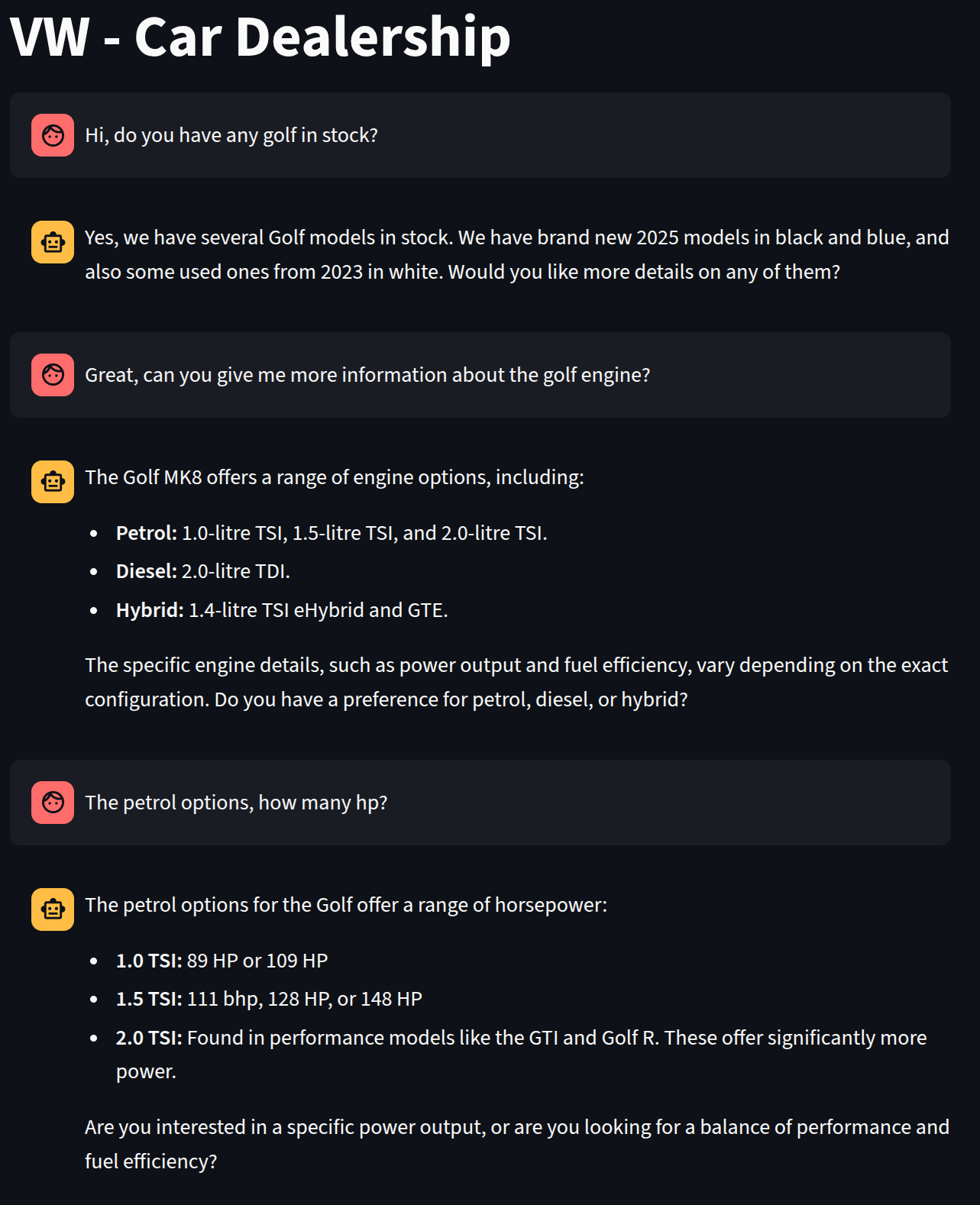
When looking at the logging, we can see that there is a ToolCall for the list_inventory and then two calls for the CarModelDetails.
Loading LLM and Graph
Calling model
ToolCall - list_inventory - Args {}
Getting inventory
Calling model
Calling model
ToolCall - CarModelDetails - Args {'user_request': 'golf engine'}
Calling model
Calling model
ToolCall - CarModelDetails - Args {'user_request': 'golf petrol engine hp'}
Calling model
Conclusion
In this post, we added FAQ capabilities to our car dealership agent. We used Cognee to extract relevant information from the FAQ files and create a graph and a vector database. Using Cognee, we can now search for information about specific car models with great precision. You can obtain the entire project code from my GitHub repository.
If you have any questions or concerns, you can reach me through LinkedIn. Thanks for reading 😀